
Pods et workloads Kubernetes#
Kubernetes ne gère pas directement des conteneurs — il gère des Pods. Et au-dessus des Pods, il existe toute une hiérarchie d’abstractions (Deployment, DaemonSet, StatefulSet…) pour répondre à différents besoins opérationnels. Ce chapitre démêle cette hiérarchie et explique quand utiliser quelle abstraction.
Le Pod : l’unité de base de Kubernetes#
Un Pod est le plus petit objet déployable dans Kubernetes. Contrairement à Docker où l’unité est le conteneur, Kubernetes encapsule un ou plusieurs conteneurs dans un Pod.
Pourquoi plusieurs conteneurs dans un Pod ?#
Les conteneurs d’un même Pod partagent :
Le namespace réseau : ils communiquent via
localhost, ont la même adresse IPLes volumes : les mêmes volumes montés sont accessibles à tous
Le cycle de vie : ils démarrent et s’arrêtent ensemble
Pattern sidecar
Le pattern le plus courant avec plusieurs conteneurs dans un Pod est le sidecar : un conteneur principal (votre application) accompagné d’un conteneur auxiliaire (un agent de log, un proxy mTLS comme Envoy, un agent de monitoring…).
Exemples :
Application + agent Fluentd (collecte des logs)
Application + Envoy proxy (maillage de service / service mesh)
Serveur web + init container (qui prépare des fichiers de configuration)
Manifeste Pod YAML#
# pod-exemple.yaml
apiVersion: v1
kind: Pod
metadata:
  name: mon-application
  namespace: default
  labels:
    app: mon-app
    version: "1.0"
    environment: production
spec:
  # Conteneur principal
  containers:
    - name: app
      image: mon-app:1.0
      ports:
        - containerPort: 8080
      # Ressources : requests = garanti, limits = maximum
      resources:
        requests:
          memory: "128Mi"
          cpu: "250m"        # 250 millicores = 0.25 CPU
        limits:
          memory: "256Mi"
          cpu: "500m"
      # Variables d'environnement
      env:
        - name: DATABASE_URL
          valueFrom:
            secretKeyRef:
              name: db-secret
              key: url
      # Probes de santé
      livenessProbe:
        httpGet:
          path: /healthz
          port: 8080
        initialDelaySeconds: 10
        periodSeconds: 30
      readinessProbe:
        httpGet:
          path: /ready
          port: 8080
        initialDelaySeconds: 5
        periodSeconds: 10

  # Conteneur sidecar (agent de logs)
  - name: log-agent
    image: fluentd:v1.16
    volumeMounts:
      - name: logs
        mountPath: /var/log/app

  volumes:
    - name: logs
      emptyDir: {}

  # Redémarrage : Always (défaut), OnFailure, Never
  restartPolicy: Always
Pourquoi ne pas déployer des Pods directement ?#
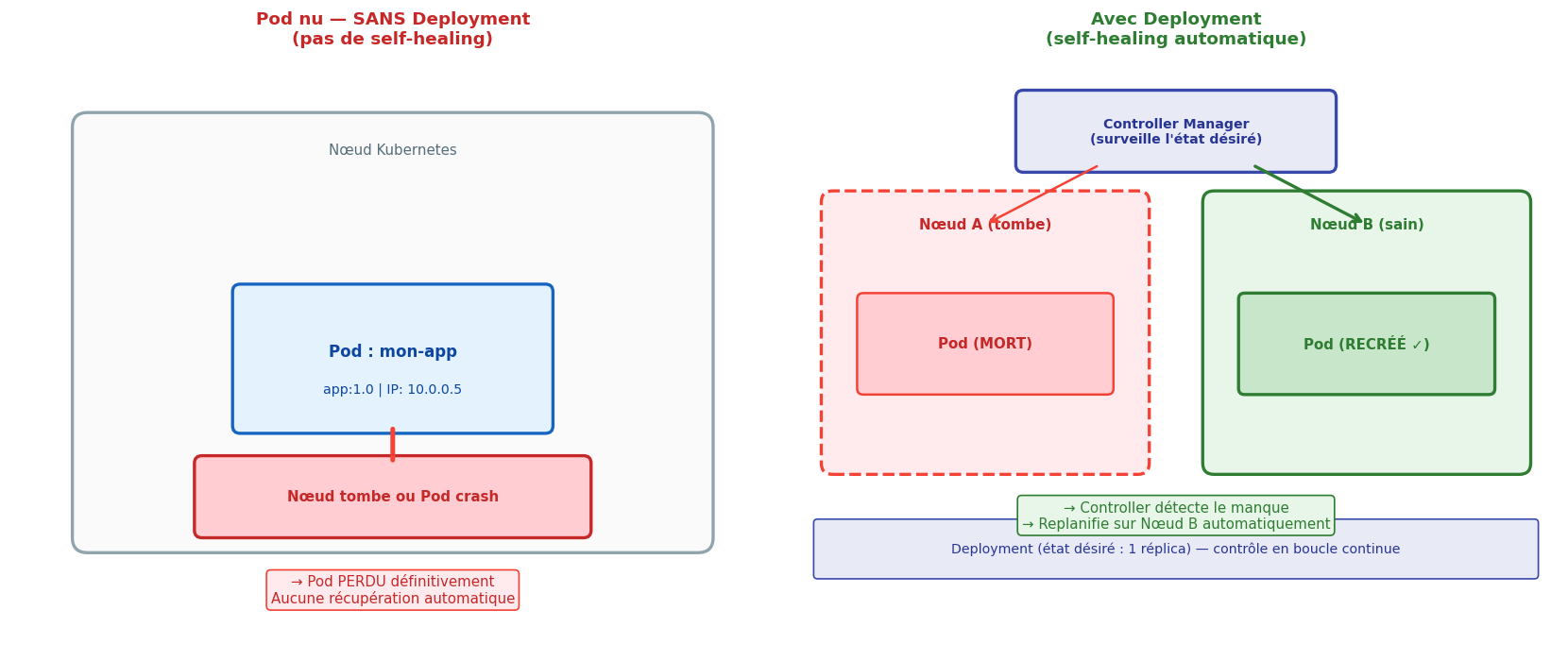
Déployer un Pod « nu » est rarement la bonne pratique en production. Si ce Pod crash ou si le nœud qui le porte tombe, il n’est pas recréé automatiquement. Les Pods nus n’ont pas de self-healing.
ReplicaSet : maintenir N réplicas#
Un ReplicaSet garantit qu’un nombre défini de réplicas d’un Pod tourne en permanence. Si un Pod crash, le ReplicaSet en crée un nouveau. Si trop de Pods tournent (ex : un Pod de trop démarré manuellement), il en supprime un.
# replicaset.yaml
apiVersion: apps/v1
kind: ReplicaSet
metadata:
  name: mon-app-rs
spec:
  replicas: 3          # État désiré : 3 Pods doivent tourner
  selector:
    matchLabels:
      app: mon-app     # Gère tous les Pods avec ce label
  template:            # Template pour créer de nouveaux Pods
    metadata:
      labels:
        app: mon-app
    spec:
      containers:
        - name: app
          image: mon-app:1.0
          ports:
            - containerPort: 8080
ReplicaSet vs Deployment
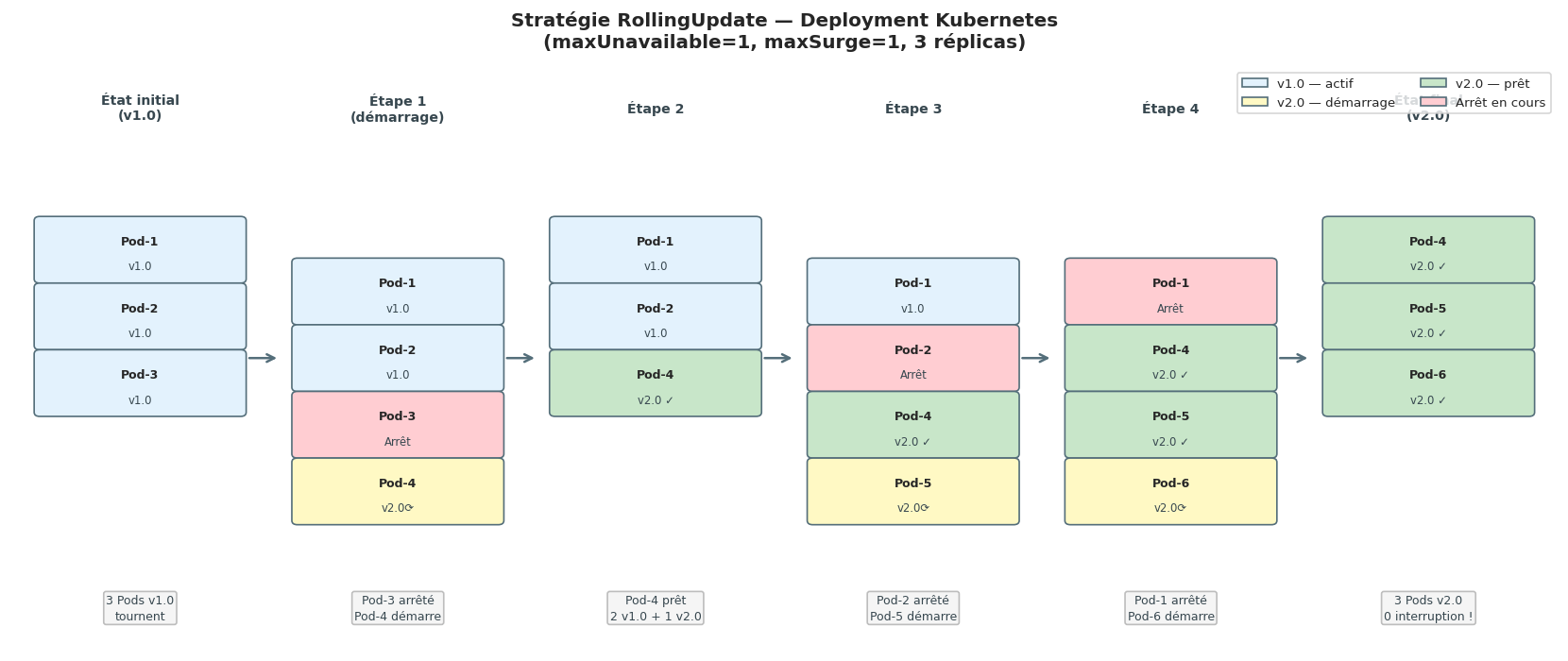
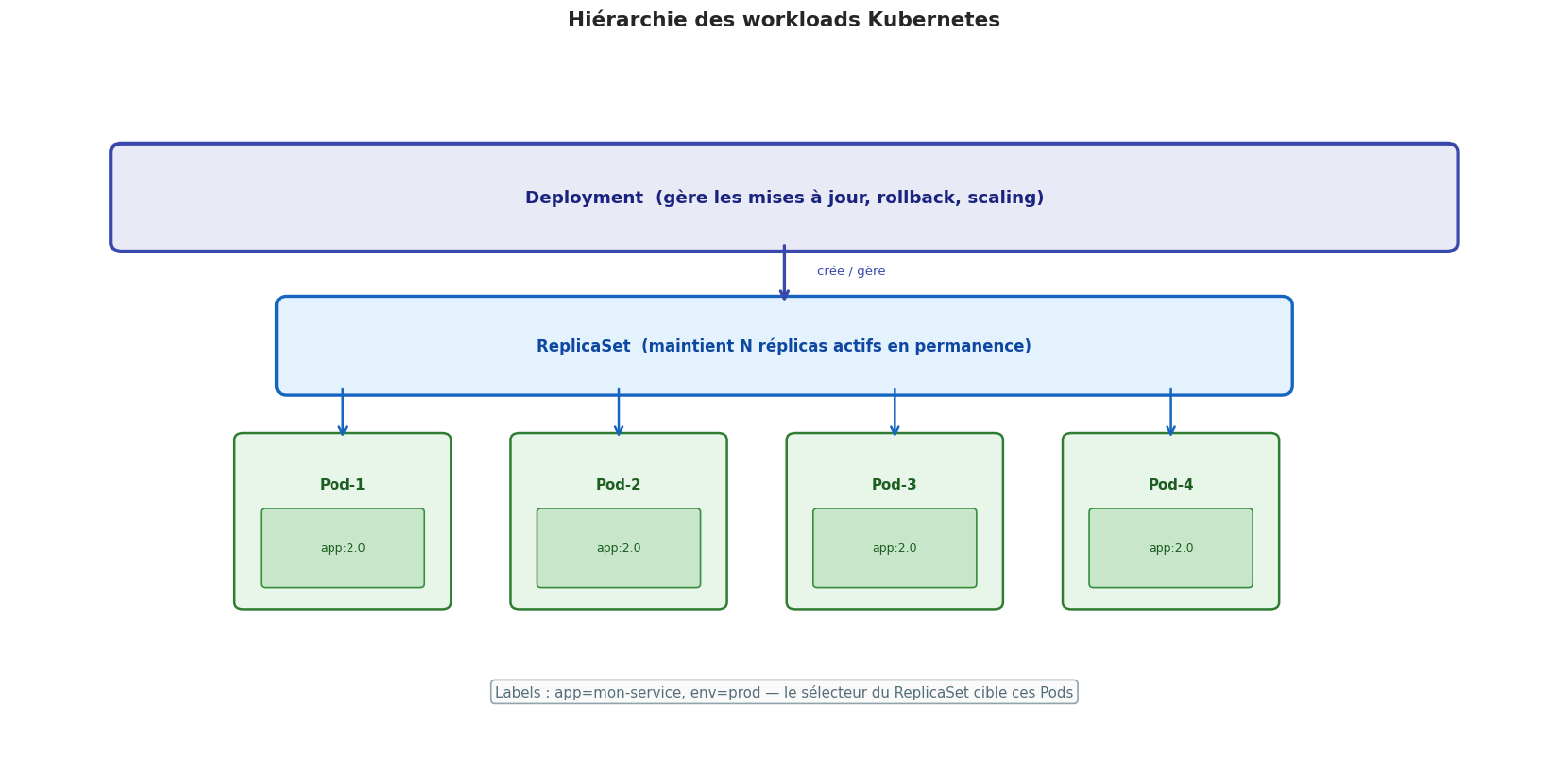
En pratique, vous ne créez jamais de ReplicaSet directement. Vous créez un Deployment, qui crée et gère les ReplicaSets pour vous. La raison : les Deployments ajoutent la gestion des mises à jour (rolling update) et du rollback par-dessus les ReplicaSets.
Deployment : le workload le plus courant#
Le Deployment est l’abstraction la plus utilisée dans Kubernetes. Il gère :
La création du ReplicaSet (qui gère les Pods)
Les mises à jour sans interruption (rolling update)
Le rollback en cas de problème
# deployment.yaml
apiVersion: apps/v1
kind: Deployment
metadata:
  name: mon-app
  labels:
    app: mon-app
spec:
  replicas: 3
  selector:
    matchLabels:
      app: mon-app
  # Stratégie de mise à jour
  strategy:
    type: RollingUpdate
    rollingUpdate:
      maxUnavailable: 1    # Au plus 1 Pod indisponible pendant la mise à jour
      maxSurge: 1          # Au plus 1 Pod en plus pendant la mise à jour
  template:
    metadata:
      labels:
        app: mon-app
        version: "2.0"
    spec:
      containers:
        - name: app
          image: mon-app:2.0
          resources:
            requests:
              cpu: "100m"
              memory: "128Mi"
            limits:
              cpu: "500m"
              memory: "256Mi"
# Commandes Deployment essentielles
kubectl apply -f deployment.yaml       # Créer ou mettre à jour
kubectl get deployments                # Lister
kubectl describe deployment mon-app    # Détails
kubectl rollout status deployment/mon-app   # Suivre une mise à jour
kubectl rollout history deployment/mon-app  # Historique des versions
kubectl rollout undo deployment/mon-app     # Rollback vers la version précédente
kubectl rollout undo deployment/mon-app --to-revision=2  # Rollback vers v2
kubectl scale deployment mon-app --replicas=5  # Scaler manuellement
DaemonSet : un Pod par nœud#
Un DaemonSet garantit qu’une copie d’un Pod tourne sur chaque nœud du cluster (ou sur un sous-ensemble de nœuds). Quand un nouveau nœud rejoint le cluster, le DaemonSet y déploie automatiquement le Pod. Quand un nœud est retiré, le Pod est supprimé.
Cas d’usage typiques :
Agents de monitoring (Prometheus Node Exporter, Datadog Agent)
Agents de collecte de logs (Fluentd, Filebeat)
Plugins réseau (CNI comme Calico, Weave)
Agents de sécurité (Falco)
# daemonset.yaml
apiVersion: apps/v1
kind: DaemonSet
metadata:
  name: node-exporter
spec:
  selector:
    matchLabels:
      app: node-exporter
  template:
    metadata:
      labels:
        app: node-exporter
    spec:
      hostNetwork: true     # Accès au réseau de l'hôte (monitoring réseau)
      hostPID: true         # Accès aux processus de l'hôte
      containers:
        - name: node-exporter
          image: prom/node-exporter:latest
          ports:
            - containerPort: 9100
          volumeMounts:
            - name: proc
              mountPath: /host/proc
              readOnly: true
      volumes:
        - name: proc
          hostPath:
            path: /proc
StatefulSet : identité et état persistant#
Un StatefulSet est utilisé pour les applications stateful (avec état) : bases de données, clusters Kafka, Elasticsearch…
Différences clés avec un Deployment :
Les Pods ont des identités stables et ordonnées :
mon-app-0,mon-app-1,mon-app-2Les Pods démarrent et s’arrêtent dans l”ordre (0 → 1 → 2)
Chaque Pod a son propre Volume Persistant (PVC) qui lui reste attaché même après redémarrage
# statefulset.yaml
apiVersion: apps/v1
kind: StatefulSet
metadata:
  name: postgres
spec:
  serviceName: postgres-headless   # Service headless requis
  replicas: 3
  selector:
    matchLabels:
      app: postgres
  template:
    metadata:
      labels:
        app: postgres
    spec:
      containers:
        - name: postgres
          image: postgres:16
          env:
            - name: POSTGRES_PASSWORD
              valueFrom:
                secretKeyRef:
                  name: postgres-secret
                  key: password
          volumeMounts:
            - name: data
              mountPath: /var/lib/postgresql/data
  # Chaque Pod reçoit son propre PVC
  volumeClaimTemplates:
    - metadata:
        name: data
      spec:
        accessModes: ["ReadWriteOnce"]
        resources:
          requests:
            storage: 10Gi
Job et CronJob : tâches ponctuelles et planifiées#
Job#
Un Job crée un ou plusieurs Pods et attend qu’ils se terminent avec succès. Contrairement à un Deployment, les Pods d’un Job ne sont pas redémarrés après leur succès.
# job.yaml
apiVersion: batch/v1
kind: Job
metadata:
  name: migration-bdd
spec:
  completions: 1        # Nombre de Pods à terminer avec succès
  parallelism: 1        # Nombre de Pods en parallèle
  backoffLimit: 3       # Nombre de tentatives en cas d'échec
  template:
    spec:
      containers:
        - name: migration
          image: mon-app:1.0
          command: ["python", "manage.py", "migrate"]
      restartPolicy: OnFailure   # Important pour les Jobs !
CronJob#
Un CronJob crée des Jobs selon un planning cron.
# cronjob.yaml
apiVersion: batch/v1
kind: CronJob
metadata:
  name: sauvegarde-nocturne
spec:
  schedule: "0 2 * * *"   # Tous les jours à 2h du matin
  jobTemplate:
    spec:
      template:
        spec:
          containers:
            - name: backup
              image: backup-tool:latest
              command: ["./backup.sh"]
          restartPolicy: OnFailure
  successfulJobsHistoryLimit: 3  # Garder les 3 derniers Jobs réussis
  failedJobsHistoryLimit: 1
Labels et sélecteurs#
Les labels sont des paires clé-valeur attachées aux objets Kubernetes. Les sélecteurs permettent de filtrer et de cibler des objets par leurs labels. C’est le système de tags qui relie toute l’architecture Kubernetes.
# Labels sur un Pod
metadata:
  labels:
    app: mon-service          # Nom de l'application
    version: "2.1.3"          # Version
    environment: production   # Environnement
    tier: backend             # Couche applicative
    team: plateforme          # Équipe responsable

# Sélecteur dans un Service
selector:
  app: mon-service
  environment: production
  # → Cible tous les Pods avec CES DEUX labels
# Utiliser les labels en ligne de commande
kubectl get pods -l app=mon-service
kubectl get pods -l environment=production,tier=backend
kubectl get pods -l "version in (2.0, 2.1)"   # Sélecteur ensembliste
kubectl label pod mon-pod release=stable       # Ajouter un label
kubectl label pod mon-pod release-             # Supprimer un label
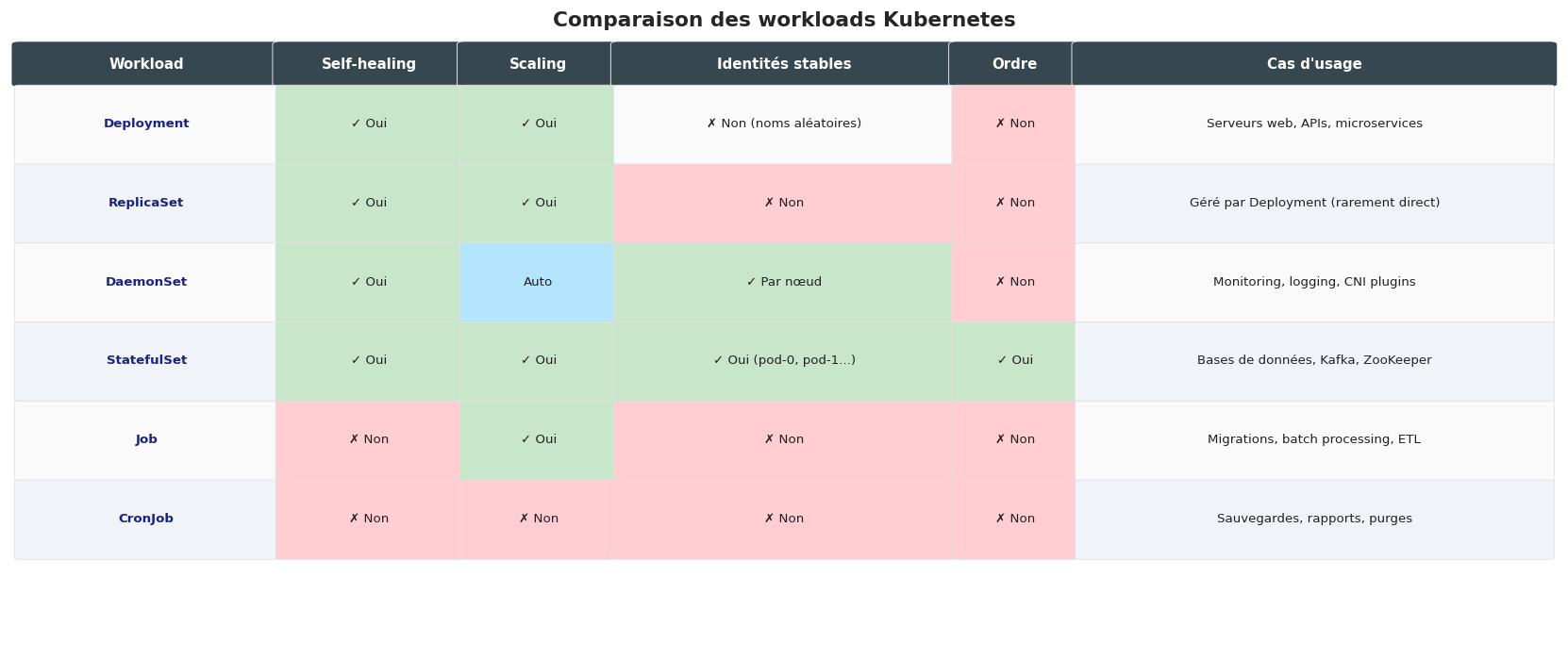
Comparaison des workloads#
Simulation Python : scheduler simplifié et parsing de manifestes#
import json
import random
from dataclasses import dataclass, field
from typing import List, Optional, Dict

@dataclass
class Noeud:
    """Représente un nœud Kubernetes dans la simulation."""
    nom: str
    cpu_total_m: int      # millicores total
    mem_total_mi: int     # MiB total
    cpu_dispo_m: int = 0
    mem_dispo_mi: int = 0
    pods: List[str] = field(default_factory=list)

    def __post_init__(self):
        self.cpu_dispo_m = self.cpu_total_m
        self.mem_dispo_mi = self.mem_total_mi

    def peut_accueillir(self, cpu_m: int, mem_mi: int) -> bool:
        return self.cpu_dispo_m >= cpu_m and self.mem_dispo_mi >= mem_mi

    def reserver(self, pod_nom: str, cpu_m: int, mem_mi: int):
        self.cpu_dispo_m -= cpu_m
        self.mem_dispo_mi -= mem_mi
        self.pods.append(pod_nom)

    def utilisation_cpu_pct(self) -> float:
        return (self.cpu_total_m - self.cpu_dispo_m) / self.cpu_total_m * 100

    def utilisation_mem_pct(self) -> float:
        return (self.mem_total_mi - self.mem_dispo_mi) / self.mem_total_mi * 100


@dataclass
class PodRequest:
    """Représente une demande de planification d'un Pod."""
    nom: str
    cpu_request_m: int    # millicores
    mem_request_mi: int   # MiB


class SchedulerSimple:
    """
    Simulation d'un scheduler Kubernetes simplifié.
    Stratégie : LeastRequested (choisir le nœud le moins chargé).
    """
    def __init__(self, noeuds: List[Noeud]):
        self.noeuds = noeuds
        self.historique = []

    def planifier(self, pod: PodRequest) -> Optional[str]:
        """Planifie un Pod sur le nœud le plus disponible."""
        candidats = [n for n in self.noeuds if n.peut_accueillir(pod.cpu_request_m, pod.mem_request_mi)]

        if not candidats:
            self.historique.append((pod.nom, None, "PENDING — aucun nœud disponible"))
            return None

        # Stratégie LeastRequested : nœud avec le plus de ressources disponibles (normalisé)
        def score(noeud: Noeud) -> float:
            cpu_score = noeud.cpu_dispo_m / noeud.cpu_total_m
            mem_score = noeud.mem_dispo_mi / noeud.mem_total_mi
            return (cpu_score + mem_score) / 2

        noeud_choisi = max(candidats, key=score)
        noeud_choisi.reserver(pod.nom, pod.cpu_request_m, pod.mem_request_mi)
        self.historique.append((pod.nom, noeud_choisi.nom,
                                 f"OK — CPU: {pod.cpu_request_m}m, Mém: {pod.mem_request_mi}Mi"))
        return noeud_choisi.nom

    def rapport(self):
        print("\n" + "="*65)
        print("Rapport de planification (Scheduler simplifié)")
        print("="*65)
        for pod_nom, noeud, statut in self.historique:
            icone = "✓" if noeud else "⚠"
            noeud_str = noeud if noeud else "AUCUN"
            print(f"  {icone} {pod_nom:<20} → {noeud_str:<15} | {statut}")

        print("\nÉtat des nœuds :")
        print(f"  {'Nœud':<15} {'CPU util.':<12} {'Mém. util.':<12} {'Pods'}")
        print("-" * 60)
        for n in self.noeuds:
            pods_str = ", ".join(n.pods) if n.pods else "(vide)"
            print(f"  {n.nom:<15} {n.utilisation_cpu_pct():<12.0f}% "
                  f"{n.utilisation_mem_pct():<12.0f}% {pods_str}")


# Simulation
noeuds = [
    Noeud("node-1", cpu_total_m=4000, mem_total_mi=8192),
    Noeud("node-2", cpu_total_m=4000, mem_total_mi=8192),
    Noeud("node-3", cpu_total_m=2000, mem_total_mi=4096),
]

pods_a_planifier = [
    PodRequest("api-0",       cpu_request_m=250,  mem_request_mi=256),
    PodRequest("api-1",       cpu_request_m=250,  mem_request_mi=256),
    PodRequest("api-2",       cpu_request_m=250,  mem_request_mi=256),
    PodRequest("db-0",        cpu_request_m=1000, mem_request_mi=2048),
    PodRequest("db-1",        cpu_request_m=1000, mem_request_mi=2048),
    PodRequest("worker-0",    cpu_request_m=500,  mem_request_mi=512),
    PodRequest("worker-1",    cpu_request_m=500,  mem_request_mi=512),
    PodRequest("log-agent-0", cpu_request_m=100,  mem_request_mi=128),
    PodRequest("log-agent-1", cpu_request_m=100,  mem_request_mi=128),
    PodRequest("log-agent-2", cpu_request_m=100,  mem_request_mi=128),
    PodRequest("gros-batch",  cpu_request_m=3000, mem_request_mi=6000),  # trop gros
]

scheduler = SchedulerSimple(noeuds)
for pod in pods_a_planifier:
    scheduler.planifier(pod)

scheduler.rapport()
=================================================================
Rapport de planification (Scheduler simplifié)
=================================================================
  ✓ api-0                → node-1          | OK — CPU: 250m, Mém: 256Mi
  ✓ api-1                → node-2          | OK — CPU: 250m, Mém: 256Mi
  ✓ api-2                → node-3          | OK — CPU: 250m, Mém: 256Mi
  ✓ db-0                 → node-1          | OK — CPU: 1000m, Mém: 2048Mi
  ✓ db-1                 → node-2          | OK — CPU: 1000m, Mém: 2048Mi
  ✓ worker-0             → node-3          | OK — CPU: 500m, Mém: 512Mi
  ✓ worker-1             → node-3          | OK — CPU: 500m, Mém: 512Mi
  ✓ log-agent-0          → node-1          | OK — CPU: 100m, Mém: 128Mi
  ✓ log-agent-1          → node-2          | OK — CPU: 100m, Mém: 128Mi
  ✓ log-agent-2          → node-1          | OK — CPU: 100m, Mém: 128Mi
  ⚠ gros-batch           → AUCUN           | PENDING — aucun nœud disponible

État des nœuds :
  Nœud            CPU util.    Mém. util.   Pods
------------------------------------------------------------
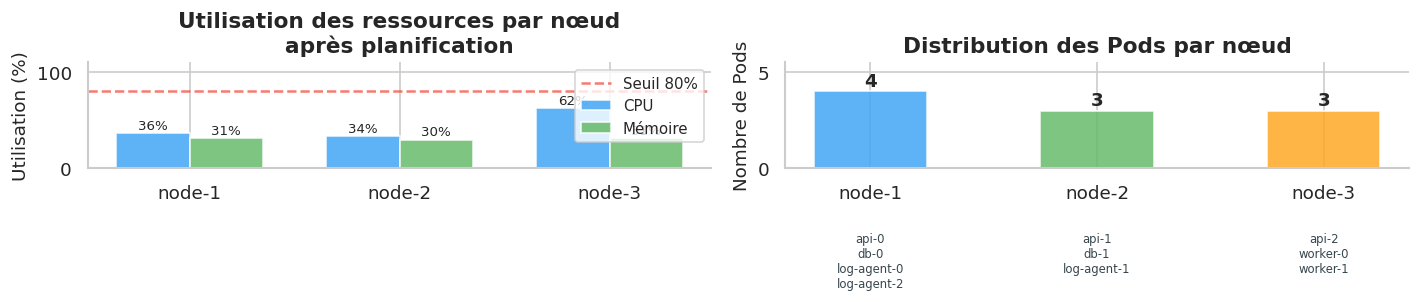
  node-1          36          % 31          % api-0, db-0, log-agent-0, log-agent-2
  node-2          34          % 30          % api-1, db-1, log-agent-1
  node-3          62          % 31          % api-2, worker-0, worker-1
Points clés à retenir#
Un Pod est l’unité de base de Kubernetes : un ou plusieurs conteneurs partageant le réseau et les volumes
Ne jamais déployer des Pods nus en production — utiliser un Deployment pour bénéficier du self-healing
Deployment → ReplicaSet → Pods : c’est la hiérarchie standard pour les applications stateless
DaemonSet pour les agents qui doivent tourner sur chaque nœud (monitoring, logging, CNI)
StatefulSet pour les applications stateful avec identité stable et stockage persistant par Pod
Job pour les tâches à exécution unique, CronJob pour les tâches planifiées
Les labels et sélecteurs sont le ciment de Kubernetes : ils relient Services, Deployments, ReplicaSets et Pods
Le RollingUpdate permet de mettre à jour sans interruption de service (
maxUnavailable+maxSurge)