Structures de contrôle#
Un script qui n’exécute que des commandes de manière linéaire, sans décision ni répétition, est d’une utilité limitée. C’est grâce aux structures de contrôle — conditions, boucles, sélections — que le shell devient un véritable langage de programmation. Ce chapitre couvre les tests (avec les subtilités importantes entre [[ ]], [ ] et test), les structures conditionnelles if/elif/else, la sélection multi-cas avec case, les boucles while, until et les trois formes de for, ainsi que les instructions de rupture break, continue et exit.
Tests et conditions#
La base de toute structure conditionnelle est l’évaluation d’une condition. En Bash, une condition est simplement une commande dont on observe le code de retour : 0 signifie vrai (succès), toute valeur non nulle signifie faux (échec). C’est l’inverse de la convention de la plupart des langages de haut niveau, mais c’est cohérent avec le modèle Unix des codes de sortie.
```{prf:definition} Tests en Bash : [[ ]], [ ] et test
:label: definition-09-01
Bash propose trois façons d’évaluer des conditions :
test expression: la commande externe (ou built-in) historique. Elle évalue l’expression et retourne 0 (vrai) ou 1 (faux). Portable POSIX.[ expression ]: syntaxe alternative àtest, équivalente. Les espaces autour des crochets sont obligatoires (il s’agit littéralement d’appeler la commande[avec l’argument de fermeture]). Portable POSIX.[[ expression ]]: extension Bash (non POSIX). Syntaxe plus moderne et plus sûre. Les principales différences avec[ ]:Pas de word splitting ni de globbing sur les variables (les guillemets deviennent optionnels pour les variables simples).
Supporte les opérateurs
&&et||directement à l’intérieur.Supporte les correspondances de motifs (
==avec wildcards et=~pour les expressions régulières POSIX étendu).La comparaison
<et>compare lexicographiquement sans avoir besoin d’échapper les opérateurs.
### Pourquoi préférer `[[ ]]` à `[ ]`

```bash
# Variable contenant des espaces
fichier="mon fichier.txt"

# [ ] — DANGEREUX sans guillemets (word splitting transforme en 3 arguments)
[ -f $fichier ]    # ERREUR : [ -f mon fichier.txt ] → trop d'arguments

# [ ] — correct avec guillemets
[ -f "$fichier" ]

# [[ ]] — sûr même sans guillemets
[[ -f $fichier ]]

# Opérateurs logiques
# [ ] — nécessite -a et -o (ou des [ ] imbriqués)
[ -f "$fichier" -a -r "$fichier" ]

# [[ ]] — supporte && et ||
[[ -f $fichier && -r $fichier ]]

# Expressions régulières : impossible avec [ ]
[[ "$email" =~ ^[a-zA-Z0-9._%+-]+@[a-zA-Z0-9.-]+\.[a-zA-Z]{2,}$ ]]

# Wildcards avec ==
[[ "$fichier" == *.txt ]]
Opérateurs de comparaison de chaînes#
a="bonjour"
b="monde"

[[ "$a" == "$b" ]]        # égalité
[[ "$a" != "$b" ]]        # différence
[[ "$a" < "$b" ]]         # ordre lexicographique inférieur (b avant m)
[[ "$a" > "$b" ]]         # ordre lexicographique supérieur
[[ -z "$a" ]]             # vrai si la chaîne est vide (-z : zero length)
[[ -n "$a" ]]             # vrai si la chaîne est non vide (-n : non-zero)

# Correspondance de motif (pattern matching)
fichier="rapport_2024_final.pdf"
[[ "$fichier" == *.pdf ]]           # vrai
[[ "$fichier" == rapport_* ]]       # vrai
[[ "$fichier" == *[0-9]* ]]         # vrai (contient des chiffres)

# Expression régulière avec =~
# IMPORTANT : le motif ne doit PAS être entre guillemets
motif='^rapport_[0-9]{4}'
[[ "$fichier" =~ $motif ]]          # vrai
# Les groupes de capture sont dans BASH_REMATCH
[[ "$fichier" =~ _([0-9]{4})_ ]]
echo "${BASH_REMATCH[1]}"            # 2024
Opérateurs de comparaison d’entiers#
Pour comparer des nombres, Bash utilise des opérateurs textuels spécifiques à l’intérieur de [ ] et [[ ]]. À l’intérieur de (( )), les opérateurs mathématiques habituels (<, >, ==, etc.) fonctionnent.
Définition 25 (Opérateurs de comparaison d’entiers)
Opérateur |
Signification |
Exemple |
|---|---|---|
|
égal (equal) |
|
|
différent (not equal) |
|
|
strictement inférieur (less than) |
|
|
inférieur ou égal (less or equal) |
|
|
strictement supérieur (greater than) |
|
|
supérieur ou égal (greater or equal) |
|
À l’intérieur de (( )), on utilise directement <, <=, >, >=, ==, !=.
x=10
y=20

[[ $x -eq 10 ]]    # vrai
[[ $x -ne $y ]]    # vrai
[[ $x -lt $y ]]    # vrai
[[ $x -ge 10 ]]    # vrai

# Avec (( )) — syntaxe plus naturelle
(( x == 10 ))     # vrai
(( x < y ))       # vrai
(( x >= 10 ))     # vrai
Tests sur les fichiers#
Les tests de fichiers sont parmi les plus utilisés dans les scripts Bash. Ils permettent de vérifier l’existence, le type et les permissions d’un fichier avant d’agir dessus.
Définition 26 (Tests sur les fichiers)
Opérateur |
Condition vérifiée |
|---|---|
|
le fichier existe (quelle que soit sa nature) |
|
existe et est un fichier ordinaire |
|
existe et est un répertoire |
|
existe et est un lien symbolique |
|
existe et est un pipe nommé |
|
existe et a une taille non nulle |
|
existe et est lisible par le processus courant |
|
existe et est accessible en écriture |
|
existe et est exécutable |
|
existe et est un fichier spécial bloc |
|
existe et est un fichier spécial caractère |
|
a été modifié depuis sa dernière lecture |
|
f1 est plus récent que f2 (newer than) |
|
f1 est plus ancien que f2 (older than) |
|
f1 et f2 sont le même fichier (même inode) |
# Vérifications courantes avant traitement
fichier="/etc/passwd"

if [[ -e "$fichier" ]]; then
    echo "Le fichier existe"
fi

if [[ -f "$fichier" && -r "$fichier" ]]; then
    echo "Fichier lisible"
fi

if [[ ! -d "/tmp/mon_répertoire" ]]; then
    mkdir -p "/tmp/mon_répertoire"
fi

# Vérifier qu'un script est exécutable
if [[ ! -x "$1" ]]; then
    echo "ERREUR : '$1' n'est pas exécutable" >&2
    exit 1
fi

# Vérifier qu'un fichier n'est pas vide
if [[ -s "rapport.txt" ]]; then
    echo "Le rapport contient des données"
fi
Opérateurs logiques#
# && (ET) et || (OU) dans [[ ]]
[[ -f "$f" && -r "$f" ]]    # f existe, est un fichier ET est lisible
[[ -z "$a" || -z "$b" ]]    # a OU b est vide

# ! (NON)
[[ ! -f "$f" ]]             # f n'existe pas ou n'est pas un fichier ordinaire

# Chaînage de commandes avec && et || en dehors des tests
mkdir répertoire && cd répertoire           # cd seulement si mkdir réussit
commande || echo "ERREUR : commande échouée"  # message si la commande échoue
commande || exit 1                          # terminer si la commande échoue
La structure if#
```{prf:definition} Structure if en Bash
:label: definition-09-04
La structure conditionnelle Bash suit la syntaxe :
if condition1; then
    commandes_si_condition1_vraie
elif condition2; then
    commandes_si_condition2_vraie
else
    commandes_par_défaut
fi
La condition est n’importe quelle commande : if vérifie simplement son code de retour (0 = vrai). Le then peut être sur la même ligne que if (séparé par ;) ou sur la ligne suivante. Les branches elif et else sont optionnelles.
### Exemples de structures `if`

```bash
# Test simple sur un fichier
if [[ -f "/etc/debian_version" ]]; then
    echo "Système Debian détecté"
fi

# Avec else
âge=25
if [[ $âge -ge 18 ]]; then
    echo "Majeur"
else
    echo "Mineur"
fi

# Avec elif — vérifier une plage de valeurs
note=75
if (( note >= 90 )); then
    mention="Très bien"
elif (( note >= 75 )); then
    mention="Bien"
elif (( note >= 60 )); then
    mention="Assez bien"
elif (( note >= 50 )); then
    mention="Passable"
else
    mention="Insuffisant"
fi
echo "Mention : $mention"

# Test de succès d'une commande
if grep -q "root" /etc/passwd; then
    echo "L'utilisateur root existe dans /etc/passwd"
fi

# Test avec code de retour explicite
if ! ping -c1 -W1 google.com &>/dev/null; then
    echo "Pas de connexion Internet détectée"
fi
Conditions avec plusieurs critères#
# Vérifier les prérequis d'un script
if [[ -z "$1" ]]; then
    echo "Usage : $0 <fichier>" >&2
    exit 1
fi

if [[ ! -f "$1" ]]; then
    echo "ERREUR : '$1' n'est pas un fichier ordinaire" >&2
    exit 2
fi

if [[ ! -r "$1" ]]; then
    echo "ERREUR : '$1' n'est pas lisible" >&2
    exit 3
fi

echo "Traitement de '$1'..."

# Vérification de l'environnement
if [[ -z "${DATABASE_URL:-}" || -z "${API_KEY:-}" ]]; then
    echo "ERREUR : les variables d'environnement DATABASE_URL et API_KEY sont requises" >&2
    exit 1
fi
La structure case#
La structure case est l’équivalent Bash des instructions switch des autres langages. Elle est plus lisible que les chaînes de if/elif quand on compare une variable à plusieurs valeurs.
```{prf:definition} Structure case en Bash
:label: definition-09-05
La syntaxe de case est :
case expression in
    motif1)
        commandes
        ;;
    motif2 | motif3)
        commandes
        ;;
    *)
        commandes_par_défaut
        ;;
esac
Les motifs supportent les wildcards shell (*, ?, [...]). Le ;; termine le bloc courant (équivalent de break en C). Deux variantes existent : ;& (continue vers le bloc suivant sans vérifier le motif — fall-through) et ;;& (continue à vérifier les motifs suivants).
### Exemples de `case`

```bash
# Sélection selon le système d'exploitation
os=$(uname -s)
case "$os" in
    Linux)
        echo "Système Linux"
        gestionnaire_paquets="apt"
        ;;
    Darwin)
        echo "Système macOS"
        gestionnaire_paquets="brew"
        ;;
    CYGWIN* | MINGW* | MSYS*)
        echo "Système Windows (émulation Unix)"
        gestionnaire_paquets="choco"
        ;;
    *)
        echo "Système non reconnu : $os" >&2
        exit 1
        ;;
esac

# Traitement des arguments en ligne de commande
action="${1:-}"
case "$action" in
    start | démarrer)
        démarrer_service
        ;;
    stop | arrêter)
        arrêter_service
        ;;
    restart | redémarrer)
        arrêter_service
        démarrer_service
        ;;
    status | état)
        vérifier_état
        ;;
    -h | --help | "")
        afficher_aide
        ;;
    *)
        echo "Action inconnue : '$action'" >&2
        afficher_aide
        exit 1
        ;;
esac

# Vérifier l'extension d'un fichier
fichier="$1"
case "${fichier,,}" in    # ,, convertit en minuscules (Bash 4+)
    *.jpg | *.jpeg | *.png | *.gif | *.webp)
        traiter_image "$fichier"
        ;;
    *.mp4 | *.avi | *.mkv | *.mov)
        traiter_vidéo "$fichier"
        ;;
    *.pdf | *.docx | *.odt)
        traiter_document "$fichier"
        ;;
    *.sh | *.bash)
        bash "$fichier"
        ;;
    *)
        echo "Type de fichier non pris en charge : $fichier" >&2
        ;;
esac
case avec fall-through (;;&)#
# ;;&  continue la vérification des motifs suivants
# ;&   tombe directement dans le bloc suivant sans vérifier

valeur=3
case "$valeur" in
    [1-3])
        echo "Entre 1 et 3"
        ;;&   # continue à vérifier
    [2-4])
        echo "Entre 2 et 4"
        ;;&   # continue à vérifier
    3)
        echo "Exactement 3"
        ;;    # stop
esac
# Affiche :
# Entre 1 et 3
# Entre 2 et 4
# Exactement 3
La boucle while#
```{prf:definition} Boucle while
:label: definition-09-06
La boucle while répète un bloc de commandes tant que la condition est vraie (code de retour 0) :
while condition; do
    commandes
done
La condition est réévaluée à chaque itération. Si elle est fausse dès le début, le corps de la boucle n’est jamais exécuté.
### Usages courants de `while`

```bash
# Compter jusqu'à 5
compteur=1
while (( compteur <= 5 )); do
    echo "Itération $compteur"
    ((compteur++))
done

# Lire un fichier ligne par ligne (idiome fondamental)
while IFS= read -r ligne; do
    echo "Ligne : $ligne"
done < fichier.txt

# Lire et traiter un CSV (en ignorant l'en-tête)
while IFS=',' read -r nom prénom âge ville; do
    echo "$nom $prénom habite à $ville (${âge} ans)"
done < <(tail -n +2 utilisateurs.csv)  # Ignorer la première ligne

# Attendre qu'un service soit disponible
délai_max=60
décompte=0
while ! curl -s http://localhost:8080/health &>/dev/null; do
    if (( décompte >= délai_max )); then
        echo "ERREUR : service non disponible après ${délai_max}s" >&2
        exit 1
    fi
    echo "En attente du service... (${décompte}s)"
    sleep 2
    ((décompte += 2))
done
echo "Service disponible !"

# Boucle infinie avec break
while true; do
    read -p "Entrez une commande (q pour quitter) : " cmd
    case "$cmd" in
        q | quit | exit)
            echo "Au revoir !"
            break
            ;;
        "")
            continue
            ;;
        *)
            eval "$cmd"
            ;;
    esac
done
IFS= read -r — l’idiome correct pour lire des lignes#
# CORRECT : IFS= préserve les espaces, -r évite l'interprétation des backslashes
while IFS= read -r ligne; do
    echo "$ligne"
done < fichier.txt

# INCORRECT (courant mais cassé sur les lignes avec espaces ou backslashes)
while read ligne; do   # word splitting actif, backslashes interprétés
    echo "$ligne"
done < fichier.txt

# Lire plusieurs champs séparés par un délimiteur
while IFS=':' read -r utilisateur _ uid gid _ répertoire shell; do
    echo "$utilisateur (uid=$uid) → $shell"
done < /etc/passwd
La boucle until#
La boucle until est l’inverse de while : elle répète le bloc tant que la condition est fausse (code de retour non nul).
# Equivalent de while (( compteur > 0 ))
compteur=5
until (( compteur == 0 )); do
    echo "Décompte : $compteur"
    ((compteur--))
done
echo "Décollage !"

# Attendre qu'un processus se termine
pid=$!  # PID du dernier processus lancé en arrière-plan
until ! kill -0 "$pid" 2>/dev/null; do
    echo "En attente de la fin du processus $pid..."
    sleep 1
done
echo "Processus $pid terminé"

# Attendre qu'un fichier apparaisse
until [[ -f /tmp/signal_départ ]]; do
    sleep 0.5
done
echo "Signal reçu, démarrage..."
La boucle for#
La boucle for de Bash existe sous trois formes distinctes, chacune adaptée à des usages différents.
Itération sur une liste#
# Itération sur une liste littérale
for fruit in pomme banane cerise fraise; do
    echo "Fruit : $fruit"
done

# Itération sur des fichiers (globbing)
for fichier in /var/log/*.log; do
    echo "Taille de $fichier : $(wc -l < "$fichier") lignes"
done

# Itération sur la sortie d'une commande
for utilisateur in $(cut -d':' -f1 /etc/passwd | head -5); do
    echo "Utilisateur : $utilisateur"
done

# Itération sur un tableau
fruits=("pomme" "banane" "cerise")
for fruit in "${fruits[@]}"; do
    echo "$fruit"
done

# Itération sur les arguments d'un script ($@)
for arg in "$@"; do
    echo "Argument : '$arg'"
done
Remarque 25
Il existe une subtilité importante avec la forme for elem in $(commande) : la sortie de la commande est soumise au word splitting et au globbing. Si les éléments peuvent contenir des espaces (comme des noms de fichiers), cette forme est dangereuse. La forme correcte pour itérer sur les lignes d’une commande est soit while IFS= read -r avec une substitution de processus, soit de stocker les résultats dans un tableau avec mapfile.
# DANGEREUX avec des noms de fichiers contenant des espaces
for f in $(find . -name "*.txt"); do ...  # CASSÉ

# CORRECT
while IFS= read -r f; do
    ...
done < <(find . -name "*.txt")

# AUSSI CORRECT (avec mapfile / readarray)
mapfile -t fichiers < <(find . -name "*.txt")
for f in "${fichiers[@]}"; do ...
### Itération sur une plage `{début..fin}`

```bash
# Plage numérique
for i in {1..10}; do
    echo "Nombre : $i"
done

# Plage avec pas
for i in {0..20..5}; do
    echo "$i"
done
# 0 5 10 15 20

# Plage alphabétique
for lettre in {a..z}; do
    echo -n "$lettre "
done
echo

# ATTENTION : les variables ne fonctionnent PAS dans les plages
n=5
for i in {1..$n}; do  # INCORRECT : {1..5} n'est pas expansé
    echo "$i"          # Affiche littéralement {1..$n}
done

# Solution : utiliser seq
for i in $(seq 1 "$n"); do
    echo "$i"
done

# Ou la boucle style C
for (( i=1; i<=n; i++ )); do
    echo "$i"
done
Boucle for style C#
# Syntaxe analogue au C
for (( i=0; i<10; i++ )); do
    echo "i = $i"
done

# Avec pas
for (( i=100; i>=0; i-=10 )); do
    echo "$i"
done

# Boucle double (tableau 2D)
for (( i=1; i<=3; i++ )); do
    for (( j=1; j<=3; j++ )); do
        printf "%4d" $((i*j))
    done
    echo
done
# Affiche la table de multiplication 3×3

# Itérer sur les indices d'un tableau
tableau=("alpha" "beta" "gamma" "delta")
for (( i=0; i<${#tableau[@]}; i++ )); do
    echo "tableau[$i] = ${tableau[$i]}"
done
Contrôle du flux : break, continue et exit#
Définition 27 (Instructions de rupture de flux)
break [N]: interrompt la boucle courante (ou les N boucles imbriquées si N est spécifié) et passe à la commande suivant la boucle.continue [N]: passe immédiatement à l’itération suivante de la boucle courante (ou de la N-ième boucle imbriquée).exit [N]: termine le script courant (ou le sous-shell courant) avec le code de retour N (0 = succès, 1-255 = erreur). Si N est omis, utilise le code de retour de la dernière commande.return [N]: utilisé à l’intérieur d’une fonction, retourne avec le code N. En dehors d’une fonction, équivalent àexit.
# break — interrompre la recherche dès le premier résultat
trouvé=false
for fichier in /etc/*.conf; do
    if grep -q "motif_recherché" "$fichier" 2>/dev/null; then
        echo "Trouvé dans : $fichier"
        trouvé=true
        break
    fi
done
[[ $trouvé == false ]] && echo "Motif non trouvé"

# continue — sauter les fichiers vides
for fichier in /var/log/*.log; do
    [[ ! -s "$fichier" ]] && continue   # Ignorer les fichiers vides
    echo "Traitement de $fichier ($(wc -l < "$fichier") lignes)"
done

# break N — interrompre deux boucles imbriquées
for i in {1..5}; do
    for j in {1..5}; do
        if (( i * j > 10 )); then
            echo "Premier produit > 10 : $i × $j = $((i*j))"
            break 2   # Sort des DEUX boucles
        fi
    done
done

# exit avec code de retour
vérifier_prérequis() {
    if ! command -v git &>/dev/null; then
        echo "ERREUR : git n'est pas installé" >&2
        exit 1
    fi
    if ! command -v python3 &>/dev/null; then
        echo "ERREUR : python3 n'est pas installé" >&2
        exit 1
    fi
    echo "Prérequis satisfaits"
}
Patterns avancés#
Le pattern guard (vérification anticipée)#
#!/usr/bin/env bash
# Vérifications au début du script, avant tout traitement
[[ $# -eq 0 ]] && { echo "Usage : $0 <fichier>" >&2; exit 1; }
[[ ! -f "$1" ]] && { echo "ERREUR : fichier non trouvé : $1" >&2; exit 2; }
[[ ! -r "$1" ]] && { echo "ERREUR : fichier non lisible : $1" >&2; exit 3; }
Sélection interactive avec select#
# Menu interactif
PS3="Choisissez une option : "
options=("Démarrer le service" "Arrêter le service" "Voir le statut" "Quitter")

select choix in "${options[@]}"; do
    case "$REPLY" in
        1) démarrer_service ;;
        2) arrêter_service ;;
        3) voir_statut ;;
        4) echo "Au revoir !"; break ;;
        *) echo "Option invalide : $REPLY" ;;
    esac
done
Tableaux de dispatch (alternative aux if/elif chaînés)#
# Au lieu d'une longue chaîne if/elif, utiliser un tableau associatif
declare -A commandes=(
    [start]="démarrer_service"
    [stop]="arrêter_service"
    [restart]="redémarrer_service"
    [status]="voir_statut"
)

action="${1:-}"
if [[ -n "${commandes[$action]+x}" ]]; then
    "${commandes[$action]}"
else
    echo "Action inconnue : '$action'" >&2
    echo "Actions disponibles : ${!commandes[*]}" >&2
    exit 1
fi
Visualisation : organigramme des structures de contrôle#
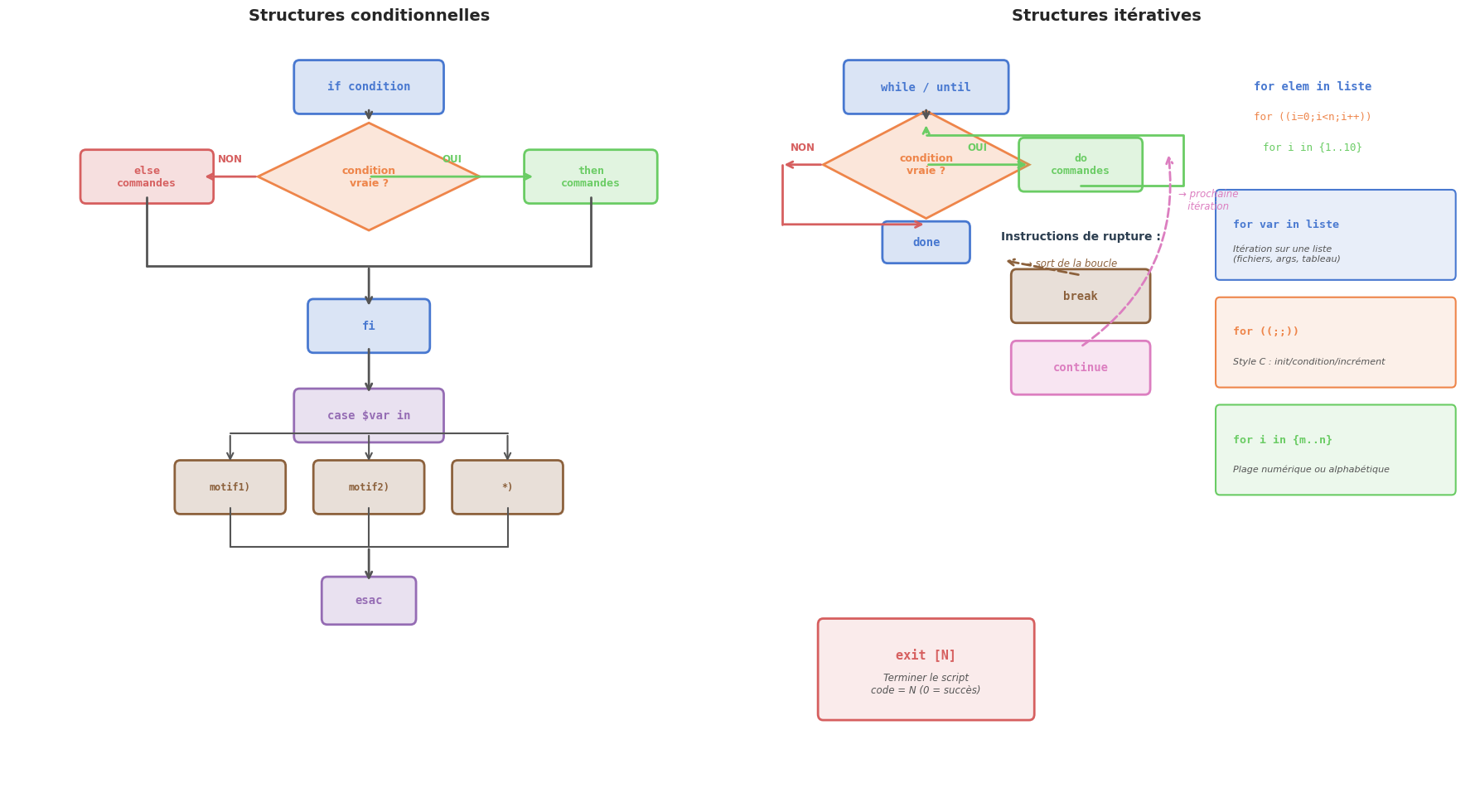
---------------------------------------------------------------------------
ValueError                                Traceback (most recent call last)
Cell In[3], line 81
     75         ax.text(x_c - 0.3, y_op + 0.12, desc,
     76                 ha='left', va='center', fontsize=9, color='#444444')
     77         ax.text(x_c - 0.3, y_op - 0.15, f'[[ {ex} ]]',
     78                 ha='left', va='center', fontsize=8, color='#888888',
     79                 style='italic', fontfamily='monospace')
---> 81 plt.tight_layout()
     82 plt.show()

File ~/legacy_workspace/notebooks/.venv/lib/python3.13/site-packages/matplotlib/pyplot.py:2843, in tight_layout(pad, h_pad, w_pad, rect)
   2835 @_copy_docstring_and_deprecators(Figure.tight_layout)
   2836 def tight_layout(
   2837     *,
   (...)   2841     rect: tuple[float, float, float, float] | None = None,
   2842 ) -> None:
-> 2843     gcf().tight_layout(pad=pad, h_pad=h_pad, w_pad=w_pad, rect=rect)

File ~/legacy_workspace/notebooks/.venv/lib/python3.13/site-packages/matplotlib/figure.py:3640, in Figure.tight_layout(self, pad, h_pad, w_pad, rect)
   3638 previous_engine = self.get_layout_engine()
   3639 self.set_layout_engine(engine)
-> 3640 engine.execute(self)
   3641 if previous_engine is not None and not isinstance(
   3642     previous_engine, (TightLayoutEngine, PlaceHolderLayoutEngine)
   3643 ):
   3644     _api.warn_external('The figure layout has changed to tight')

File ~/legacy_workspace/notebooks/.venv/lib/python3.13/site-packages/matplotlib/layout_engine.py:188, in TightLayoutEngine.execute(self, fig)
    186 renderer = fig._get_renderer()
    187 with getattr(renderer, "_draw_disabled", nullcontext)():
--> 188     kwargs = get_tight_layout_figure(
    189         fig, fig.axes, get_subplotspec_list(fig.axes), renderer,
    190         pad=info['pad'], h_pad=info['h_pad'], w_pad=info['w_pad'],
    191         rect=info['rect'])
    192 if kwargs:
    193     fig.subplots_adjust(**kwargs)

File ~/legacy_workspace/notebooks/.venv/lib/python3.13/site-packages/matplotlib/_tight_layout.py:266, in get_tight_layout_figure(fig, axes_list, subplotspec_list, renderer, pad, h_pad, w_pad, rect)
    261         return {}
    262     span_pairs.append((
    263         slice(ss.rowspan.start * div_row, ss.rowspan.stop * div_row),
    264         slice(ss.colspan.start * div_col, ss.colspan.stop * div_col)))
--> 266 kwargs = _auto_adjust_subplotpars(fig, renderer,
    267                                   shape=(max_nrows, max_ncols),
    268                                   span_pairs=span_pairs,
    269                                   subplot_list=subplot_list,
    270                                   ax_bbox_list=ax_bbox_list,
    271                                   pad=pad, h_pad=h_pad, w_pad=w_pad)
    273 # kwargs can be none if tight_layout fails...
    274 if rect is not None and kwargs is not None:
    275     # if rect is given, the whole subplots area (including
    276     # labels) will fit into the rect instead of the
   (...)    280     # auto_adjust_subplotpars twice, where the second run
    281     # with adjusted rect parameters.

File ~/legacy_workspace/notebooks/.venv/lib/python3.13/site-packages/matplotlib/_tight_layout.py:82, in _auto_adjust_subplotpars(fig, renderer, shape, span_pairs, subplot_list, ax_bbox_list, pad, h_pad, w_pad, rect)
     80 for ax in subplots:
     81     if ax.get_visible():
---> 82         bb += [martist._get_tightbbox_for_layout_only(ax, renderer)]
     84 tight_bbox_raw = Bbox.union(bb)
     85 tight_bbox = fig.transFigure.inverted().transform_bbox(tight_bbox_raw)

File ~/legacy_workspace/notebooks/.venv/lib/python3.13/site-packages/matplotlib/artist.py:1402, in _get_tightbbox_for_layout_only(obj, *args, **kwargs)
   1396 """
   1397 Matplotlib's `.Axes.get_tightbbox` and `.Axis.get_tightbbox` support a
   1398 *for_layout_only* kwarg; this helper tries to use the kwarg but skips it
   1399 when encountering third-party subclasses that do not support it.
   1400 """
   1401 try:
-> 1402     return obj.get_tightbbox(*args, **{**kwargs, "for_layout_only": True})
   1403 except TypeError:
   1404     return obj.get_tightbbox(*args, **kwargs)

File ~/legacy_workspace/notebooks/.venv/lib/python3.13/site-packages/matplotlib/axes/_base.py:4587, in _AxesBase.get_tightbbox(self, renderer, call_axes_locator, bbox_extra_artists, for_layout_only)
   4584     bbox_artists = self.get_default_bbox_extra_artists()
   4586 for a in bbox_artists:
-> 4587     bbox = a.get_tightbbox(renderer)
   4588     if (bbox is not None
   4589             and 0 < bbox.width < np.inf
   4590             and 0 < bbox.height < np.inf):
   4591         bb.append(bbox)

File ~/legacy_workspace/notebooks/.venv/lib/python3.13/site-packages/matplotlib/artist.py:364, in Artist.get_tightbbox(self, renderer)
    348 def get_tightbbox(self, renderer=None):
    349     """
    350     Like `.Artist.get_window_extent`, but includes any clipping.
    351
   (...)    362         Returns None if clipping results in no intersection.
    363     """
--> 364     bbox = self.get_window_extent(renderer)
    365     if self.get_clip_on():
    366         clip_box = self.get_clip_box()

File ~/legacy_workspace/notebooks/.venv/lib/python3.13/site-packages/matplotlib/text.py:969, in Text.get_window_extent(self, renderer, dpi)
    964     raise RuntimeError(
    965         "Cannot get window extent of text w/o renderer. You likely "
    966         "want to call 'figure.draw_without_rendering()' first.")
    968 with cbook._setattr_cm(fig, dpi=dpi):
--> 969     bbox, info, descent = self._get_layout(self._renderer)
    970     x, y = self.get_unitless_position()
    971     x, y = self.get_transform().transform((x, y))

File ~/legacy_workspace/notebooks/.venv/lib/python3.13/site-packages/matplotlib/text.py:382, in Text._get_layout(self, renderer)
    380 clean_line, ismath = self._preprocess_math(line)
    381 if clean_line:
--> 382     w, h, d = _get_text_metrics_with_cache(
    383         renderer, clean_line, self._fontproperties,
    384         ismath=ismath, dpi=self.get_figure(root=True).dpi)
    385 else:
    386     w = h = d = 0

File ~/legacy_workspace/notebooks/.venv/lib/python3.13/site-packages/matplotlib/text.py:69, in _get_text_metrics_with_cache(renderer, text, fontprop, ismath, dpi)
     66 """Call ``renderer.get_text_width_height_descent``, caching the results."""
     67 # Cached based on a copy of fontprop so that later in-place mutations of
     68 # the passed-in argument do not mess up the cache.
---> 69 return _get_text_metrics_with_cache_impl(
     70     weakref.ref(renderer), text, fontprop.copy(), ismath, dpi)

File ~/legacy_workspace/notebooks/.venv/lib/python3.13/site-packages/matplotlib/text.py:77, in _get_text_metrics_with_cache_impl(renderer_ref, text, fontprop, ismath, dpi)
     73 @functools.lru_cache(4096)
     74 def _get_text_metrics_with_cache_impl(
     75         renderer_ref, text, fontprop, ismath, dpi):
     76     # dpi is unused, but participates in cache invalidation (via the renderer).
---> 77     return renderer_ref().get_text_width_height_descent(text, fontprop, ismath)

File ~/legacy_workspace/notebooks/.venv/lib/python3.13/site-packages/matplotlib/backends/backend_agg.py:215, in RendererAgg.get_text_width_height_descent(self, s, prop, ismath)
    211     return super().get_text_width_height_descent(s, prop, ismath)
    213 if ismath:
    214     ox, oy, width, height, descent, font_image = \
--> 215         self.mathtext_parser.parse(s, self.dpi, prop)
    216     return width, height, descent
    218 font = self._prepare_font(prop)

File ~/legacy_workspace/notebooks/.venv/lib/python3.13/site-packages/matplotlib/mathtext.py:86, in MathTextParser.parse(self, s, dpi, prop, antialiased)
     81 from matplotlib.backends import backend_agg
     82 load_glyph_flags = {
     83     "vector": LoadFlags.NO_HINTING,
     84     "raster": backend_agg.get_hinting_flag(),
     85 }[self._output_type]
---> 86 return self._parse_cached(s, dpi, prop, antialiased, load_glyph_flags)

File ~/legacy_workspace/notebooks/.venv/lib/python3.13/site-packages/matplotlib/mathtext.py:100, in MathTextParser._parse_cached(self, s, dpi, prop, antialiased, load_glyph_flags)
     97 if self._parser is None:  # Cache the parser globally.
     98     self.__class__._parser = _mathtext.Parser()
--> 100 box = self._parser.parse(s, fontset, fontsize, dpi)
    101 output = _mathtext.ship(box)
    102 if self._output_type == "vector":

File ~/legacy_workspace/notebooks/.venv/lib/python3.13/site-packages/matplotlib/_mathtext.py:2167, in Parser.parse(self, s, fonts_object, fontsize, dpi)
   2164     result = self._expression.parse_string(s)
   2165 except ParseBaseException as err:
   2166     # explain becomes a plain method on pyparsing 3 (err.explain(0)).
-> 2167     raise ValueError("\n" + ParseException.explain(err, 0)) from None
   2168 self._state_stack = []
   2169 self._in_subscript_or_superscript = False

ValueError:
[[ "$a" == "$b" ]]
    ^
ParseException: Expected end of text, found '$'  (at char 4), (line:1, col:5)
Error in callback <function _draw_all_if_interactive at 0x7f0c2e6936a0> (for post_execute), with arguments args (),kwargs {}:
---------------------------------------------------------------------------
ValueError                                Traceback (most recent call last)
File ~/legacy_workspace/notebooks/.venv/lib/python3.13/site-packages/matplotlib/pyplot.py:278, in _draw_all_if_interactive()
    276 def _draw_all_if_interactive() -> None:
    277     if matplotlib.is_interactive():
--> 278         draw_all()

File ~/legacy_workspace/notebooks/.venv/lib/python3.13/site-packages/matplotlib/_pylab_helpers.py:131, in Gcf.draw_all(cls, force)
    129 for manager in cls.get_all_fig_managers():
    130     if force or manager.canvas.figure.stale:
--> 131         manager.canvas.draw_idle()

File ~/legacy_workspace/notebooks/.venv/lib/python3.13/site-packages/matplotlib/backend_bases.py:1893, in FigureCanvasBase.draw_idle(self, *args, **kwargs)
   1891 if not self._is_idle_drawing:
   1892     with self._idle_draw_cntx():
-> 1893         self.draw(*args, **kwargs)

File ~/legacy_workspace/notebooks/.venv/lib/python3.13/site-packages/matplotlib/backends/backend_agg.py:382, in FigureCanvasAgg.draw(self)
    379 # Acquire a lock on the shared font cache.
    380 with (self.toolbar._wait_cursor_for_draw_cm() if self.toolbar
    381       else nullcontext()):
--> 382     self.figure.draw(self.renderer)
    383     # A GUI class may be need to update a window using this draw, so
    384     # don't forget to call the superclass.
    385     super().draw()

File ~/legacy_workspace/notebooks/.venv/lib/python3.13/site-packages/matplotlib/artist.py:94, in _finalize_rasterization.<locals>.draw_wrapper(artist, renderer, *args, **kwargs)
     92 @wraps(draw)
     93 def draw_wrapper(artist, renderer, *args, **kwargs):
---> 94     result = draw(artist, renderer, *args, **kwargs)
     95     if renderer._rasterizing:
     96         renderer.stop_rasterizing()

File ~/legacy_workspace/notebooks/.venv/lib/python3.13/site-packages/matplotlib/artist.py:71, in allow_rasterization.<locals>.draw_wrapper(artist, renderer)
     68     if artist.get_agg_filter() is not None:
     69         renderer.start_filter()
---> 71     return draw(artist, renderer)
     72 finally:
     73     if artist.get_agg_filter() is not None:

File ~/legacy_workspace/notebooks/.venv/lib/python3.13/site-packages/matplotlib/figure.py:3257, in Figure.draw(self, renderer)
   3254             # ValueError can occur when resizing a window.
   3256     self.patch.draw(renderer)
-> 3257     mimage._draw_list_compositing_images(
   3258         renderer, self, artists, self.suppressComposite)
   3260     renderer.close_group('figure')
   3261 finally:

File ~/legacy_workspace/notebooks/.venv/lib/python3.13/site-packages/matplotlib/image.py:134, in _draw_list_compositing_images(renderer, parent, artists, suppress_composite)
    132 if not_composite or not has_images:
    133     for a in artists:
--> 134         a.draw(renderer)
    135 else:
    136     # Composite any adjacent images together
    137     image_group = []

File ~/legacy_workspace/notebooks/.venv/lib/python3.13/site-packages/matplotlib/artist.py:71, in allow_rasterization.<locals>.draw_wrapper(artist, renderer)
     68     if artist.get_agg_filter() is not None:
     69         renderer.start_filter()
---> 71     return draw(artist, renderer)
     72 finally:
     73     if artist.get_agg_filter() is not None:

File ~/legacy_workspace/notebooks/.venv/lib/python3.13/site-packages/matplotlib/axes/_base.py:3226, in _AxesBase.draw(self, renderer)
   3223 if artists_rasterized:
   3224     _draw_rasterized(self.get_figure(root=True), artists_rasterized, renderer)
-> 3226 mimage._draw_list_compositing_images(
   3227     renderer, self, artists, self.get_figure(root=True).suppressComposite)
   3229 renderer.close_group('axes')
   3230 self.stale = False

File ~/legacy_workspace/notebooks/.venv/lib/python3.13/site-packages/matplotlib/image.py:134, in _draw_list_compositing_images(renderer, parent, artists, suppress_composite)
    132 if not_composite or not has_images:
    133     for a in artists:
--> 134         a.draw(renderer)
    135 else:
    136     # Composite any adjacent images together
    137     image_group = []

File ~/legacy_workspace/notebooks/.venv/lib/python3.13/site-packages/matplotlib/artist.py:71, in allow_rasterization.<locals>.draw_wrapper(artist, renderer)
     68     if artist.get_agg_filter() is not None:
     69         renderer.start_filter()
---> 71     return draw(artist, renderer)
     72 finally:
     73     if artist.get_agg_filter() is not None:

File ~/legacy_workspace/notebooks/.venv/lib/python3.13/site-packages/matplotlib/text.py:752, in Text.draw(self, renderer)
    749 renderer.open_group('text', self.get_gid())
    751 with self._cm_set(text=self._get_wrapped_text()):
--> 752     bbox, info, descent = self._get_layout(renderer)
    753     trans = self.get_transform()
    755     # don't use self.get_position here, which refers to text
    756     # position in Text:

File ~/legacy_workspace/notebooks/.venv/lib/python3.13/site-packages/matplotlib/text.py:382, in Text._get_layout(self, renderer)
    380 clean_line, ismath = self._preprocess_math(line)
    381 if clean_line:
--> 382     w, h, d = _get_text_metrics_with_cache(
    383         renderer, clean_line, self._fontproperties,
    384         ismath=ismath, dpi=self.get_figure(root=True).dpi)
    385 else:
    386     w = h = d = 0

File ~/legacy_workspace/notebooks/.venv/lib/python3.13/site-packages/matplotlib/text.py:69, in _get_text_metrics_with_cache(renderer, text, fontprop, ismath, dpi)
     66 """Call ``renderer.get_text_width_height_descent``, caching the results."""
     67 # Cached based on a copy of fontprop so that later in-place mutations of
     68 # the passed-in argument do not mess up the cache.
---> 69 return _get_text_metrics_with_cache_impl(
     70     weakref.ref(renderer), text, fontprop.copy(), ismath, dpi)

File ~/legacy_workspace/notebooks/.venv/lib/python3.13/site-packages/matplotlib/text.py:77, in _get_text_metrics_with_cache_impl(renderer_ref, text, fontprop, ismath, dpi)
     73 @functools.lru_cache(4096)
     74 def _get_text_metrics_with_cache_impl(
     75         renderer_ref, text, fontprop, ismath, dpi):
     76     # dpi is unused, but participates in cache invalidation (via the renderer).
---> 77     return renderer_ref().get_text_width_height_descent(text, fontprop, ismath)

File ~/legacy_workspace/notebooks/.venv/lib/python3.13/site-packages/matplotlib/backends/backend_agg.py:215, in RendererAgg.get_text_width_height_descent(self, s, prop, ismath)
    211     return super().get_text_width_height_descent(s, prop, ismath)
    213 if ismath:
    214     ox, oy, width, height, descent, font_image = \
--> 215         self.mathtext_parser.parse(s, self.dpi, prop)
    216     return width, height, descent
    218 font = self._prepare_font(prop)

File ~/legacy_workspace/notebooks/.venv/lib/python3.13/site-packages/matplotlib/mathtext.py:86, in MathTextParser.parse(self, s, dpi, prop, antialiased)
     81 from matplotlib.backends import backend_agg
     82 load_glyph_flags = {
     83     "vector": LoadFlags.NO_HINTING,
     84     "raster": backend_agg.get_hinting_flag(),
     85 }[self._output_type]
---> 86 return self._parse_cached(s, dpi, prop, antialiased, load_glyph_flags)

File ~/legacy_workspace/notebooks/.venv/lib/python3.13/site-packages/matplotlib/mathtext.py:100, in MathTextParser._parse_cached(self, s, dpi, prop, antialiased, load_glyph_flags)
     97 if self._parser is None:  # Cache the parser globally.
     98     self.__class__._parser = _mathtext.Parser()
--> 100 box = self._parser.parse(s, fontset, fontsize, dpi)
    101 output = _mathtext.ship(box)
    102 if self._output_type == "vector":

File ~/legacy_workspace/notebooks/.venv/lib/python3.13/site-packages/matplotlib/_mathtext.py:2167, in Parser.parse(self, s, fonts_object, fontsize, dpi)
   2164     result = self._expression.parse_string(s)
   2165 except ParseBaseException as err:
   2166     # explain becomes a plain method on pyparsing 3 (err.explain(0)).
-> 2167     raise ValueError("\n" + ParseException.explain(err, 0)) from None
   2168 self._state_stack = []
   2169 self._in_subscript_or_superscript = False

ValueError:
[[ "$a" == "$b" ]]
    ^
ParseException: Expected end of text, found '$'  (at char 4), (line:1, col:5)
---------------------------------------------------------------------------
ValueError                                Traceback (most recent call last)
File ~/legacy_workspace/notebooks/.venv/lib/python3.13/site-packages/IPython/core/formatters.py:402, in BaseFormatter.__call__(self, obj)
    400     pass
    401 else:
--> 402     return printer(obj)
    403 # Finally look for special method names
    404 method = get_real_method(obj, self.print_method)

File ~/legacy_workspace/notebooks/.venv/lib/python3.13/site-packages/IPython/core/pylabtools.py:170, in print_figure(fig, fmt, bbox_inches, base64, **kwargs)
    167     from matplotlib.backend_bases import FigureCanvasBase
    168     FigureCanvasBase(fig)
--> 170 fig.canvas.print_figure(bytes_io, **kw)
    171 data = bytes_io.getvalue()
    172 if fmt == 'svg':

File ~/legacy_workspace/notebooks/.venv/lib/python3.13/site-packages/matplotlib/backend_bases.py:2157, in FigureCanvasBase.print_figure(self, filename, dpi, facecolor, edgecolor, orientation, format, bbox_inches, pad_inches, bbox_extra_artists, backend, **kwargs)
   2154     # we do this instead of `self.figure.draw_without_rendering`
   2155     # so that we can inject the orientation
   2156     with getattr(renderer, "_draw_disabled", nullcontext)():
-> 2157         self.figure.draw(renderer)
   2158 if bbox_inches:
   2159     if bbox_inches == "tight":

File ~/legacy_workspace/notebooks/.venv/lib/python3.13/site-packages/matplotlib/artist.py:94, in _finalize_rasterization.<locals>.draw_wrapper(artist, renderer, *args, **kwargs)
     92 @wraps(draw)
     93 def draw_wrapper(artist, renderer, *args, **kwargs):
---> 94     result = draw(artist, renderer, *args, **kwargs)
     95     if renderer._rasterizing:
     96         renderer.stop_rasterizing()

File ~/legacy_workspace/notebooks/.venv/lib/python3.13/site-packages/matplotlib/artist.py:71, in allow_rasterization.<locals>.draw_wrapper(artist, renderer)
     68     if artist.get_agg_filter() is not None:
     69         renderer.start_filter()
---> 71     return draw(artist, renderer)
     72 finally:
     73     if artist.get_agg_filter() is not None:

File ~/legacy_workspace/notebooks/.venv/lib/python3.13/site-packages/matplotlib/figure.py:3257, in Figure.draw(self, renderer)
   3254             # ValueError can occur when resizing a window.
   3256     self.patch.draw(renderer)
-> 3257     mimage._draw_list_compositing_images(
   3258         renderer, self, artists, self.suppressComposite)
   3260     renderer.close_group('figure')
   3261 finally:

File ~/legacy_workspace/notebooks/.venv/lib/python3.13/site-packages/matplotlib/image.py:134, in _draw_list_compositing_images(renderer, parent, artists, suppress_composite)
    132 if not_composite or not has_images:
    133     for a in artists:
--> 134         a.draw(renderer)
    135 else:
    136     # Composite any adjacent images together
    137     image_group = []

File ~/legacy_workspace/notebooks/.venv/lib/python3.13/site-packages/matplotlib/artist.py:71, in allow_rasterization.<locals>.draw_wrapper(artist, renderer)
     68     if artist.get_agg_filter() is not None:
     69         renderer.start_filter()
---> 71     return draw(artist, renderer)
     72 finally:
     73     if artist.get_agg_filter() is not None:

File ~/legacy_workspace/notebooks/.venv/lib/python3.13/site-packages/matplotlib/axes/_base.py:3226, in _AxesBase.draw(self, renderer)
   3223 if artists_rasterized:
   3224     _draw_rasterized(self.get_figure(root=True), artists_rasterized, renderer)
-> 3226 mimage._draw_list_compositing_images(
   3227     renderer, self, artists, self.get_figure(root=True).suppressComposite)
   3229 renderer.close_group('axes')
   3230 self.stale = False

File ~/legacy_workspace/notebooks/.venv/lib/python3.13/site-packages/matplotlib/image.py:134, in _draw_list_compositing_images(renderer, parent, artists, suppress_composite)
    132 if not_composite or not has_images:
    133     for a in artists:
--> 134         a.draw(renderer)
    135 else:
    136     # Composite any adjacent images together
    137     image_group = []

File ~/legacy_workspace/notebooks/.venv/lib/python3.13/site-packages/matplotlib/artist.py:71, in allow_rasterization.<locals>.draw_wrapper(artist, renderer)
     68     if artist.get_agg_filter() is not None:
     69         renderer.start_filter()
---> 71     return draw(artist, renderer)
     72 finally:
     73     if artist.get_agg_filter() is not None:

File ~/legacy_workspace/notebooks/.venv/lib/python3.13/site-packages/matplotlib/text.py:752, in Text.draw(self, renderer)
    749 renderer.open_group('text', self.get_gid())
    751 with self._cm_set(text=self._get_wrapped_text()):
--> 752     bbox, info, descent = self._get_layout(renderer)
    753     trans = self.get_transform()
    755     # don't use self.get_position here, which refers to text
    756     # position in Text:

File ~/legacy_workspace/notebooks/.venv/lib/python3.13/site-packages/matplotlib/text.py:382, in Text._get_layout(self, renderer)
    380 clean_line, ismath = self._preprocess_math(line)
    381 if clean_line:
--> 382     w, h, d = _get_text_metrics_with_cache(
    383         renderer, clean_line, self._fontproperties,
    384         ismath=ismath, dpi=self.get_figure(root=True).dpi)
    385 else:
    386     w = h = d = 0

File ~/legacy_workspace/notebooks/.venv/lib/python3.13/site-packages/matplotlib/text.py:69, in _get_text_metrics_with_cache(renderer, text, fontprop, ismath, dpi)
     66 """Call ``renderer.get_text_width_height_descent``, caching the results."""
     67 # Cached based on a copy of fontprop so that later in-place mutations of
     68 # the passed-in argument do not mess up the cache.
---> 69 return _get_text_metrics_with_cache_impl(
     70     weakref.ref(renderer), text, fontprop.copy(), ismath, dpi)

File ~/legacy_workspace/notebooks/.venv/lib/python3.13/site-packages/matplotlib/text.py:77, in _get_text_metrics_with_cache_impl(renderer_ref, text, fontprop, ismath, dpi)
     73 @functools.lru_cache(4096)
     74 def _get_text_metrics_with_cache_impl(
     75         renderer_ref, text, fontprop, ismath, dpi):
     76     # dpi is unused, but participates in cache invalidation (via the renderer).
---> 77     return renderer_ref().get_text_width_height_descent(text, fontprop, ismath)

File ~/legacy_workspace/notebooks/.venv/lib/python3.13/site-packages/matplotlib/backends/backend_agg.py:215, in RendererAgg.get_text_width_height_descent(self, s, prop, ismath)
    211     return super().get_text_width_height_descent(s, prop, ismath)
    213 if ismath:
    214     ox, oy, width, height, descent, font_image = \
--> 215         self.mathtext_parser.parse(s, self.dpi, prop)
    216     return width, height, descent
    218 font = self._prepare_font(prop)

File ~/legacy_workspace/notebooks/.venv/lib/python3.13/site-packages/matplotlib/mathtext.py:86, in MathTextParser.parse(self, s, dpi, prop, antialiased)
     81 from matplotlib.backends import backend_agg
     82 load_glyph_flags = {
     83     "vector": LoadFlags.NO_HINTING,
     84     "raster": backend_agg.get_hinting_flag(),
     85 }[self._output_type]
---> 86 return self._parse_cached(s, dpi, prop, antialiased, load_glyph_flags)

File ~/legacy_workspace/notebooks/.venv/lib/python3.13/site-packages/matplotlib/mathtext.py:100, in MathTextParser._parse_cached(self, s, dpi, prop, antialiased, load_glyph_flags)
     97 if self._parser is None:  # Cache the parser globally.
     98     self.__class__._parser = _mathtext.Parser()
--> 100 box = self._parser.parse(s, fontset, fontsize, dpi)
    101 output = _mathtext.ship(box)
    102 if self._output_type == "vector":

File ~/legacy_workspace/notebooks/.venv/lib/python3.13/site-packages/matplotlib/_mathtext.py:2167, in Parser.parse(self, s, fonts_object, fontsize, dpi)
   2164     result = self._expression.parse_string(s)
   2165 except ParseBaseException as err:
   2166     # explain becomes a plain method on pyparsing 3 (err.explain(0)).
-> 2167     raise ValueError("\n" + ParseException.explain(err, 0)) from None
   2168 self._state_stack = []
   2169 self._in_subscript_or_superscript = False

ValueError:
[[ "$a" == "$b" ]]
    ^
ParseException: Expected end of text, found '$'  (at char 4), (line:1, col:5)
<Figure size 1600x700 with 1 Axes>
Résumé#
Dans ce chapitre, nous avons parcouru l’intégralité des structures de contrôle de Bash :
[[ ]]est la forme recommandée pour les tests en Bash : pas de word splitting ni de globbing accidentel, support des opérateurs&&/||, des wildcards avec==et des expressions régulières avec=~.[ ]est l’alternative portable POSIX mais requiert plus de précautions.Les opérateurs de comparaison diffèrent selon le type : chaînes (
=,!=,<,>), entiers (-eq,-ne,-lt,-gt,-le,-ge), fichiers (-e,-f,-d,-r,-w,-x,-s). À l’intérieur de(( )), les opérateurs mathématiques usuels s’appliquent.if/elif/elseévalue le code de retour de n’importe quelle commande (0 = vrai). Les brancheselifpermettent les chaînes de conditions.caseteste une expression contre des motifs avec wildcards. Le;;termine chaque branche,;;&continue la vérification des motifs suivants.whilerépète tant que la condition est vraie ;untilrépète tant qu’elle est fausse. L’idiomewhile IFS= read -r ligne; do ... done < fichierest la façon correcte de lire un fichier ligne par ligne.forexiste en trois variantes : liste (for x in ...), plage (for x in {1..10}), style C (for ((;;))). La forme liste est dangereuse avec$(commande)et des noms contenant des espaces — préférerwhile readdans ce cas.break,continueetexitcontrôlent le flux dans les boucles et les scripts.break Netcontinue Npermettent de gérer les boucles imbriquées.
Dans le chapitre suivant, nous aborderons l’écriture de fonctions et de scripts professionnels : organisation du code, gestion des arguments, portée des variables, codes de retour et bonnes pratiques pour les scripts robustes en production.